 Celebrate with up to 80% off
What is vanish mode? A simple guide to disappearing messages across popular apps



Vanish mode, or disappearing messages, gives you a way to add a degree of privacy to sensitive conversations. However, different apps use different names and rules for these features, which can significantly affect how private your chats really are. Most apps have this feature turned off by default, but you can enable it in the settings.
What is vanish mode?
Vanish mode is a term some apps use for chats where messages disappear, but it's not a universal term. Other apps call similar features disappearing messages, auto-delete, secret chats, or view-once media.
Depending on the app, messages may disappear after a set timer, after they are seen, or after a recipient opens a specific piece of media. Some apps let users apply this to individual messages, specific chats, or default chat settings across the app.
How vanish mode differs from regular messaging
Normally, many instant messaging apps keep conversations persistent by default. This means participants can often scroll through a chat and review past messages, media, and links unless someone deletes them or the app applies a separate retention rule.
How long the history remains available varies by app, chat type, backup settings, and linked devices. In many cases, chat history can remain accessible for months or years.
Users can often delete chat data from their own device to manage storage. Some apps also let users delete individual messages, either just for themselves or, in some cases, for everyone in the chat.
This is distinct from disappearing message features, which automatically remove content based on rules set by the app or the user, such as a timer or a one-time view. Even so, the exact behavior depends on the platform, and some apps may allow exceptions such as keeping certain disappearing messages.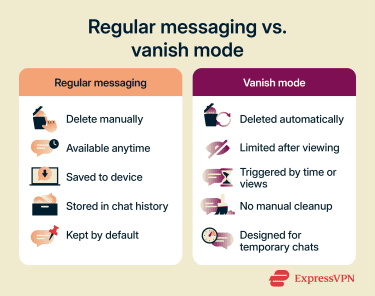
How does vanish mode work?
Many popular messaging and social apps support disappearing messages, but they differ in how the feature works and how much control you get. These settings can have important privacy and usability implications, so it’s worth understanding how they work in each app.
In many cases, disappearing messages are not enabled by default. Depending on the app, you can either activate the feature for a specific chat, send temporary media individually, or switch part of a conversation into a temporary-message mode.
Some apps let one user turn the feature on, while others may handle disappearing messages differently depending on the chat type and settings.
When messages disappear
Most apps support one or both of these approaches:
- After viewing: Often used for certain media, such as photos, videos, voice messages, or Snaps. Depending on the app, the content may disappear after it's opened, though some services allow a replay or other exceptions.
- Timed delay: Usually applies to entire chats or message threads, making messages available only for a set period. Depending on the app, the timer may be tied to when the message is sent, delivered, or read.
In group chats, the exact behavior can vary by app. In some cases, content may remain available to other participants until it expires or is saved in accordance with the platform’s rules.
On platforms that use timers, messages may disappear at the same scheduled interval for everyone in the chat, but the details depend on how that app applies its disappearing-message rules
Which apps offer vanish mode or similar features
Here is a quick overview of popular apps that offer vanish mode or similar disappearing-message features and how they differ:
| App | Feature name | Default behavior | Deletion triggers | Timer options | Applies to | Screenshot blocking |
| Vanish mode and disappearing photos/videos | Off | Chats disappear after someone leaves the chat or turns off Vanish mode. Media disappear after viewing | 24 hours, 7 days | Primarily 1-to-1 chats with separate disappearing media options | Yes | |
| Disappearing messages and View Once | Off | Timed delay for chats and after viewing for View Once media | 24 hours, 7 days, 90 days | 1-to-1 chats, group chats. View Once for individual media | Not for disappearing chats, but View Once has screenshot blocking | |
| Facebook Messenger | Disappearing messages | Off | Timed delay after messages are seen | Custom timer in encrypted chats. Unread messages disappear after 14 days | 1-to-1 and group chats | Yes |
| Snapchat | Auto-delete chats and Snaps | On for many chats | After viewing or after a time limit, depending on content and settings | After viewing, 24 hours, 7 days, or never. Unopened Snaps delete after 31 days | 1-to-1 and group chats | Yes |
| Signal | Disappearing messages | Off | Timed delay | Custom or up to 4 weeks | 1-to-1 and group chats | No, but screen security can block screenshots on the user's Windows/Android device |
| Telegram | Auto-delete messages and Secret Chat | Off | Timed delay after sending in regular chats. Deleted after reading in Secret Chats | 1 day, 1 week, or 1 month for regular chats | 1-to-1 chats, groups, and channels. Admins control timers in groups/channels | Protected Content can prevent screenshots in groups/channels |
There are many other social and communication apps, such as Viber and Dust, that have similar features. Keep in mind that support can vary by app version, device, chat type, and region. For example, Instagram says disappearing messages in chats are only available in certain locations.
What happens to photos, videos, and chat history
Unlike conventional messages, temporary media are not always handled the same way as regular photos, videos, or files. Some apps limit saving, downloading, forwarding, or long-term access, but the exact rules vary by feature and platform, and users may still find workarounds.
Normally, using vanish mode or disappearing messages doesn't affect past chat history. In many apps, only messages sent after the setting is turned on will disappear, while older conversations remain intact.
Similarly, disappearing one-off messages may still appear within the normal flow of a conversation until they expire or are opened. Depending on the app, the chat may show an indicator that disappearing messages are in use or that content is no longer available.
Can vanish mode detect screenshots?
Some apps try to detect screenshots or screen recordings of disappearing content, while others try to block certain captures or offer no special warning at all. The exact behavior depends on the app, device, and message type.
For example, Instagram can notify users if it detects a screenshot or screen recording of disappearing content, while WhatsApp blocks screenshots for View Once messages. Signal, by contrast, offers screen-security settings that can block screenshots on the user’s own device in some cases, such as Windows 11 and certain Android setups.
Even so, disappearing messages are not foolproof. People may still capture content using another device, and some forms of copying may happen outside the app’s detection or blocking tools.
Can someone tell if you're using vanish mode?
It depends on the app, but many apps do notify participants when disappearing messages or vanish mode are enabled. This may appear as a chat notification, a timer icon, or another in-chat indicator.
Apps do this to help reduce confusion about how messages in that conversation will behave. In some cases, disappearing or view-once content also includes a visual indicator showing that it is temporary.
How to use vanish mode
The steps to enable vanish mode or similar disappearing-message features vary slightly depending on the app and the type of content you want to make temporary. Some apps use a dedicated vanish-mode chat, while others use disappearing-message timers instead.
How to turn on vanish mode on Instagram
Instagram offers both vanish mode and other disappearing-message features, so the platform may refer more generally to disappearing messages in chats.
Here’s how to enable vanish mode on Android and iOS:
- Open Messages by tapping the arrow icon in the main menu.

- Tap a chat to open the conversation.
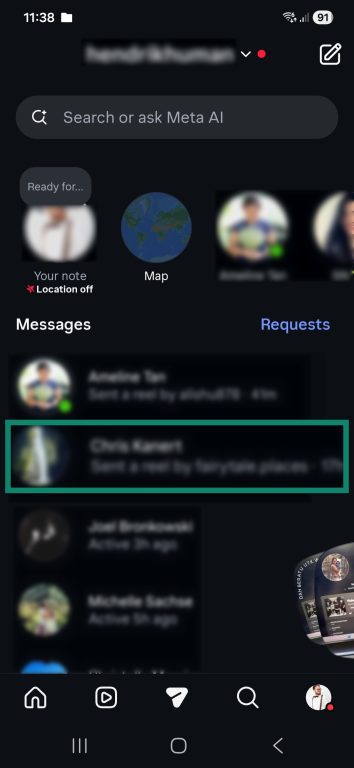
- Swipe up from the bottom of the screen until you see a notification stating that the feature has been turned on.
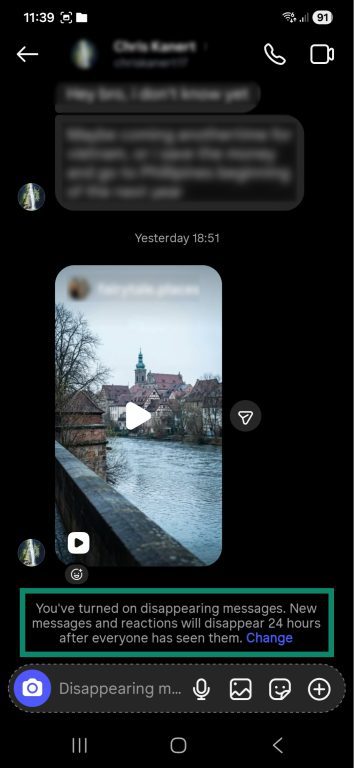
- Tap Change to adjust the time settings.
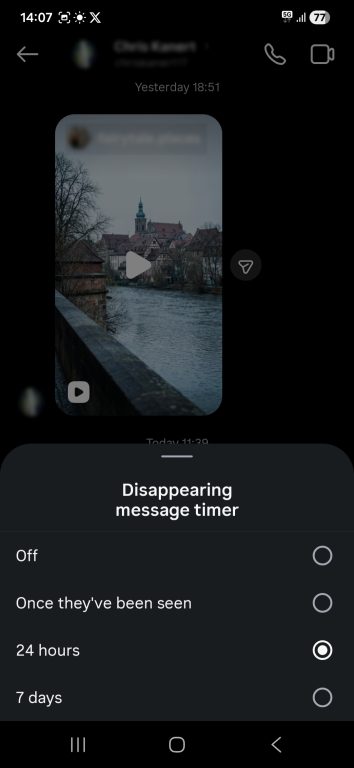
To turn off vanish mode, swipe up again in the chat.
How to turn on vanish mode on Messenger
While Meta has discontinued the vanish mode on Messenger, you can get similar functionality through disappearing messages in end-to-end encrypted chats. Here’s how to enable the feature:
- Launch the Messenger mobile app.
- Tap a contact to open the chat window.
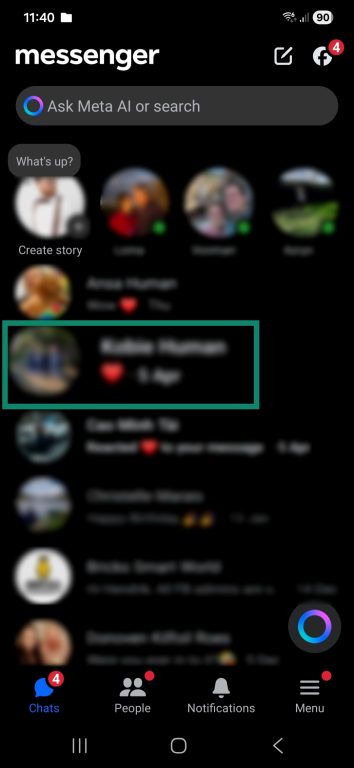
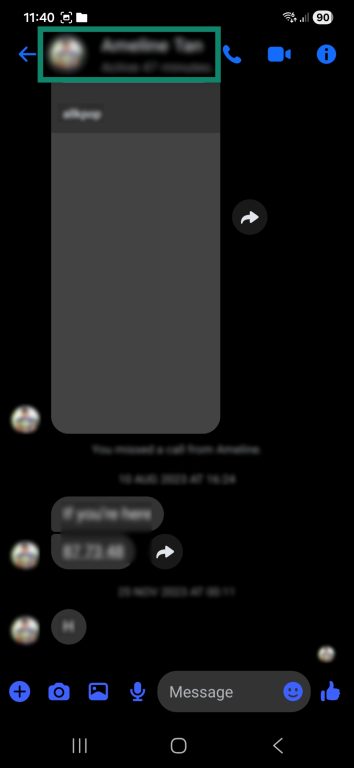
- Tap the contact’s name or the group chat name at the top of the page to open the chat settings.
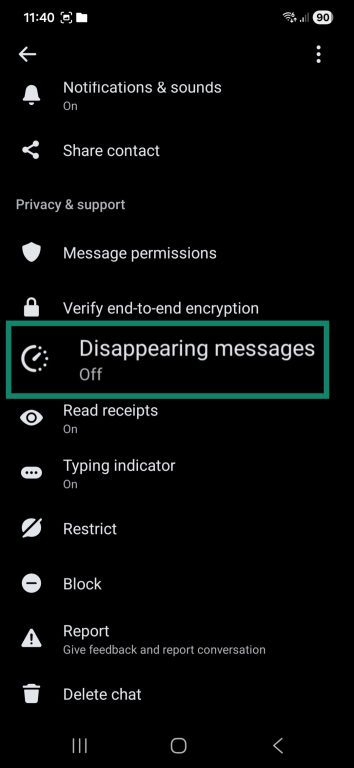
- Tap Disappearing messages.
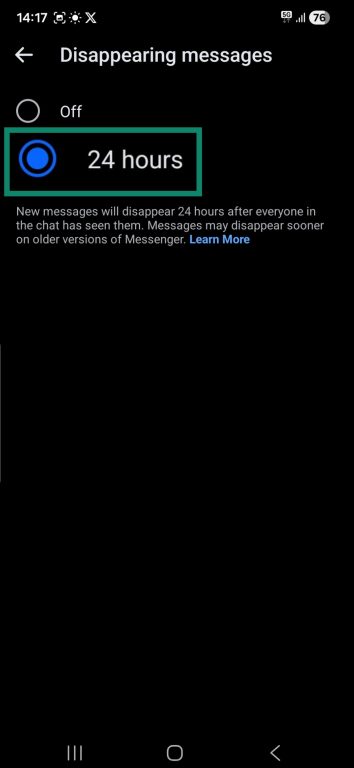
- In the pop-up window, select the 24 hours option and click Done.
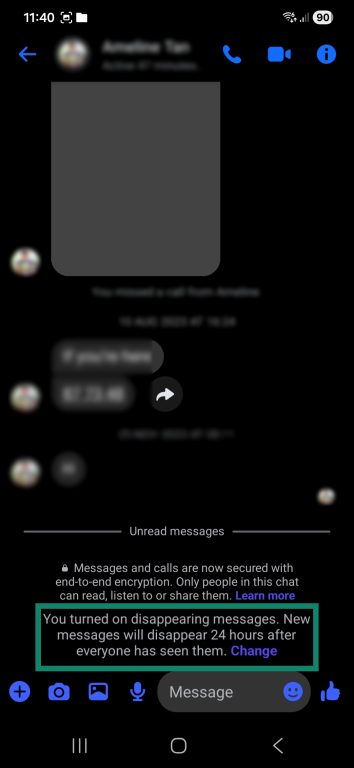
- Disappearing messages are now active on Messenger.
Note: If using a mobile browser, this feature is not available.
Why do people use vanish mode?
Features that allow users to send temporary messages can serve a variety of purposes, from helping with organization to adding a degree of privacy.
More privacy for casual conversations
Texts or photos sent with a vanish mode feature are designed to disappear, reducing how long they remain visible in a chat. That can help reduce exposure when sensitive details or personal thoughts are shared. However, disappearing messages are not foolproof, and recipients may still capture the content before it disappears.
Because the messages may also disappear from the conversation on your device after expiry, the feature can reduce the chance that someone with later physical access to the device will see older content
Less clutter in your inbox
Messaging apps often save media you send and receive locally on your device. Over time, this can use storage space or add to an app’s cache and data.
Temporary messages are not always stored locally in the same way and are usually deleted automatically after a period of time. That can help reduce clutter on both users’ devices, especially when sending many images and videos that have no long-term value.
More control over temporary chats
Vanish mode can also be useful when a conversation doesn't need to stay visible indefinitely. For example, people may prefer disappearing messages when chatting with new contacts or arranging short-term plans.
People may also use disappearing-message features in marketplace or social chats, but availability can vary by app, account type, device, and region.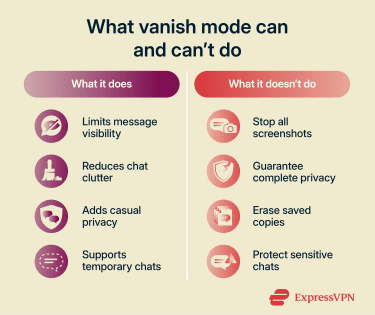
Limitations of vanish mode
While many use vanish mode as a privacy tool, it’s not a perfect solution. It’s important to understand its limitations before sharing sensitive information online.
Users also need to consider the underlying security of the apps they use. Apps like WhatsApp, Telegram, and Snapchat may differ in how they handle encryption, permissions, and user data. For example, WhatsApp uses end-to-end encryption (E2EE) for personal messages and calls, while Telegram reserves E2EE for Secret Chats rather than regular cloud chats. Snapchat focuses heavily on temporary content and privacy features, but that should not be treated as identical to the security model of a fully E2EE chat app.
Messages can still be copied
Vanish mode doesn't stop someone from saving content before it disappears. Depending on the app, screenshot blocking or notifications may be limited, inconsistent, or unavailable. Someone can also capture the message using another device.
Fraud and misunderstandings
Scammers and cybercriminals can use vanish mode to trick victims or cover their tracks. Disappearing messages may make it harder for users to recover them later, making it more difficult to review a conversation after the fact. However, that does not always mean the content is unrecoverable in every case. Instagram, for example, allows reporting vanish-mode messages for up to 14 days after they disappear, and WhatsApp supports kept messages in some disappearing-message chats.
For example, fraudsters may enable temporary chats in an online sale scam. If the conversation disappears quickly, a target may have less time to assess the situation or preserve what was said.
Similarly, vanish mode can cause misunderstandings in legitimate conversations. If one party is not aware that the feature is enabled, they may be confused when messages disappear.
Data collection and digital footprint
Some people may use vanish mode in the hope that it will reduce how long messages remain visible or accessible. That can limit how much content stays in a chat, but it doesn't automatically stop broader data collection.
How much information a platform can retain still depends on the app’s design, including its encryption, metadata practices, backups, and linked devices. Even when message contents disappear, other data about the conversation may still exist.
Technical errors
Bugs or sync issues may affect how disappearing messages behave across devices. In some edge cases, content may remain available longer than expected or interact unexpectedly with backups and recovery. For example, WhatsApp's View Once media can be restored from backups if the backup was made before the item was opened.
FAQ
Does vanish mode delete messages for both people?
Can vanish mode be turned off?
Why isn't vanish mode showing in my app?
Does vanish mode work in group chats?
Are disappearing messages the same as vanish mode?