 Celebrate with up to 80% off
Is PayPal safe? What you need to know before you send money


PayPal has over 400 million active accounts worldwide, making it one of the most widely used online payment platforms. That scale also makes it a common target for scams and account abuse.
The platform uses encryption, fraud detection, two-factor authentication (2FA), and buyer and seller protection to secure your payments and data. But those protections have limits, and some of the most common risks have nothing to do with PayPal’s infrastructure. They depend on how payments are made and how accounts are secured.
This guide explains how PayPal’s security works in practice, what protections exist for buyers and sellers, how the platform handles data, and where the main risks are.
What is PayPal, and how does it work?
PayPal is a digital wallet and online payment service that lets people and businesses send, receive, and manage money safely all over the world.
It acts as an intermediary and stores your bank or card details, allowing you to make purchases without sharing your financial information with merchants. You can pay online or in-store or send money to others using an email address or mobile number.
The seller receives payment confirmation, but not your financial details. This reduces how widely your card details are stored across merchants and limits what can be exposed if their systems are compromised.
How transactions work
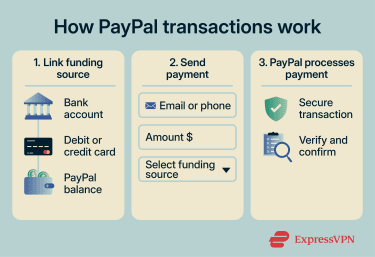
PayPal payments follow a simple flow:
- Link a funding source: This can be a bank account, debit or credit card, or your PayPal balance. PayPal verifies the account to confirm it’s yours, which prevents unauthorized accounts from being linked.
- Send the payment: You enter the recipient’s email, phone number, or PayPal username, choose an amount and funding source, and confirm the transaction.
- PayPal processes the transaction: The platform handles the payment and confirms it to the seller without passing on your financial details.
Is PayPal safe to use? (quick answer)
PayPal is designed to protect:
- Data at rest and in transit (encryption).
- Account access (2FA and passkeys).
- Eligible transactions (buyer and seller protection).
For most standard transactions, these protections work as intended. However, PayPal doesn’t fully protect against:
- Users being tricked into sending money (scams).
- Account compromise due to weak credentials.
- Payments sent using non-protected methods.
- Disputes that fall outside its policy rules.
Most real-world risk comes from how the account is used rather than failures in PayPal’s core systems.
PayPal security features
PayPal’s security is built into how the platform operates and layered across login, payment processing, and transaction monitoring.
Encryption and data protection
PayPal uses Transport Layer Security (TLS) to encrypt data in transit between your device and its servers. This means that if an attacker intercepts the traffic, the data appears as unreadable ciphertext.
It’s important to note that TLS protects data in transit, not on compromised devices. If your device has been infected with malware, encryption won’t help prevent data theft at that level.
PayPal also encrypts data stored on its servers, so account and transaction information is protected at rest, not only in transit.
At the payment level, PayPal limits exposure by not sharing your full card or bank details with merchants. If a merchant is breached, the exposed data is limited to transaction records, not your financial details.
On mobile, additional security comes from the device itself: app sandboxing isolates PayPal from other apps (ensuring they can’t access each other’s data) and secure authentication methods like biometrics or device PINs.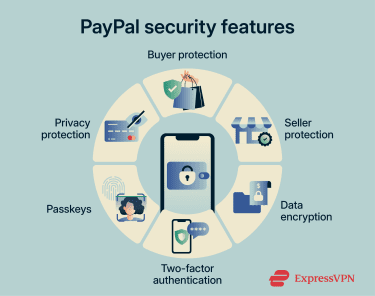
Fraud monitoring and alerts
PayPal monitors transactions in real time using automated risk scoring. The system evaluates signals like device fingerprinting, transaction patterns and velocity, location and IP address, and past account activity.
If a transaction differs significantly from normal patterns, for example, a login from a new country followed by a large transfer, PayPal may:
- Flag or delay the transaction.
- Request additional verification.
- Temporarily restrict the account.
For merchants, PayPal also provides Fraud Protection Advanced, which allows businesses to configure custom risk rules and transaction filters on top of the standard protections applied to personal accounts.
Two-factor authentication (2FA) and passkeys
2FA adds a second step to logging in beyond a password. However, it’s not active by default, so you need to enable it manually.
PayPal offers 2FA through an authenticator app or SMS, depending on the account and region. Authenticator apps are generally the stronger option since they’re resistant to SIM-swapping attacks.
PayPal also supports passkeys, which are a passwordless login method tied to your device. You authenticate using biometrics or a PIN.
Passkeys are stronger than passwords and 2FA because they can’t be reused across sites, are resistant to phishing attacks, and can’t be entered into fake websites.
PayPal privacy and data handling
PayPal is a regulated financial services provider, which means it has to collect and store personal data. It gathers this information from your interactions, connected financial accounts, and, sometimes, from third-party vendors.
These are some of the types of data the platform collects.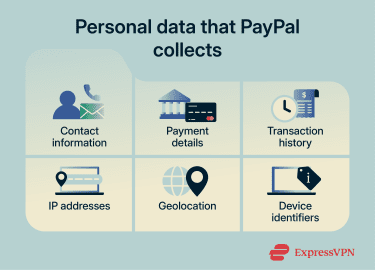
What also matters is how that data is used, who it’s shared with, and what control you have.
How does PayPal use your data?
PayPal uses your data to process payments, verify your identity (know-your-customer or KYC), and monitor transactions for fraud and regulatory compliance (anti-money laundering). This includes analyzing your device, location, and transaction patterns to detect activity that doesn’t match your normal account use.
Where PayPal collects biometric data, such as face scans or voice recognition, for identity verification, the platform states it does so with consent. However, biometric verification is often required to restore account access or lift restrictions, so declining it can have consequences.
Who does PayPal share your data with?
PayPal shares data with a range of third parties:
- Financial partners and payment processors: For example, card networks like Visa and Mastercard and banks to process payments.
- Legal and regulatory: Tax authorities and law enforcement, when required.
- Merchants and partners: Receive your name, email, phone number, and address to fulfill orders. They may also receive data on your shopping preferences to personalize offers.
- Service providers: Third parties that perform services on PayPal’s behalf, such as marketing, customer service, and IT support.
- PayPal affiliates: Other companies in its ecosystem, such as Venmo and Honey.
Once shared, your data is handled according to those parties’ security practices.
Your rights and options
Depending on your region, you may be able to:
- Access your data: You can request a copy of the information linked to your account.
- Delete your data: Closing your account triggers a deletion request, although PayPal keeps some data for up to 10 years to meet legal obligations.
- Limit certain uses: Under the EU’s General Data Protection Regulations (GDPR) or the California Consumer Privacy Act (CCPA), you may have the right to restrict certain types of data processing or sharing.
- Opt out of marketing: You can adjust marketing preferences and notification settings directly in your account.
Overall, using PayPal involves a trade-off. The platform relies on identity verification and behavioral analysis to prevent fraud and comply with financial regulations, which requires collecting and retaining user data.
This improves security and accountability but also means your activity is tied to a verified identity and may be shared across PayPal’s broader ecosystem as part of how the service operates.
Is PayPal safe for buyers?
PayPal’s Purchase Protection covers specific situations. If the payment type or transaction category falls outside its scope, you’re not covered.
What Purchase Protection covers
You may be eligible for a full refund, including shipping costs, under two circumstances:
- Item not received: Your order never arrives.
- Item significantly not as described: The item is materially different from what the seller describes; for example, receiving a completely different product, the item is severely damaged, or the product is missing key components that were not disclosed. Minor issues or unmet expectations don’t apply.
If a claim is approved, PayPal may refund the full purchase amount and original shipping costs.
Buyer protection isn’t automatic. You first have to meet certain eligibility criteria: have an account in good standing, use your PayPal account to pay for an eligible item in a single payment, and use the “Goods and Services” payment type.
Secondly, the evidence determines the outcome. A valid delivery tracking number may result in an "item not received" claim being denied. For "not as described" claims, you'll need clear supporting evidence such as photos or documentation.
You generally have up to 180 days from the day you paid for an item you have not received and 30 days from the delivery of a product that is significantly different from its description to submit a dispute.
What Purchase Protection doesn’t cover
Not all purchases are included in the program. Here are some common exclusions.
| Category | Details |
| “Friends and Family” payments | Treated as personal transfers |
| In-person transactions | Items you personally collect or buy from a physical store, unless using a specific QR code for goods and services |
| Vehicles and real estate | Land, houses, industrial machinery, and cars |
| Gift and prepaid cards | Excluded as cash-like items |
| Financial products | Donations, investments, or gold |
Is PayPal safe for sellers?
Like PayPal’s Purchase Protection program, Seller Protection covers sellers against fraudulent “unauthorized transaction” and “item not received” claims, but only under certain criteria.
To be eligible, sellers need to ship to the address shown on the transaction details page and provide valid proof of shipment or delivery. Signature confirmation is recommended for higher-value transactions, but for transactions processed after January 26, 2026, PayPal says it is no longer mandatory.
What Seller Protection covers
Seller Protection is limited to certain claim types:
- Unauthorized transactions: Payments marked as eligible on the transaction details page where the buyer claims they didn’t authorize the transaction.
- Item not received: Claims that the product was never delivered filed through PayPal’s Resolution Center.
What’s not covered:
- Items delivered but reported as significantly not as described.
- Counterfeit items.
- Items delivered or collected in person.
- Items delivered to an address different from the one listed in the transaction details page.
If a buyer goes directly to their card issuer rather than PayPal’s Resolution Center, Seller Protection doesn’t apply to that claim, even if the item was shipped correctly.
Common PayPal scams
Most PayPal scams don’t involve breaking into the platform itself. They work by getting PayPal users to hand over access or approve a transaction.
Phishing emails and money request scams
Phishing is one of the main ways attackers gain access to PayPal accounts. The pattern is consistent: impersonate PayPal, create urgency, and push you to act outside the platform.
The message often looks routine. It may confirm a payment, flag unusual activity, or ask you to reset your password. The key element is the link or phone number. It pushes you to a fake PayPal login page, where any credentials you enter go straight to the attacker.
In some cases, attackers have used PayPal’s notification infrastructure, specifically its money request system, to send fake invoices or money requests for purchases you didn’t make. These emails originate from genuine PayPal systems, making them harder to distinguish from legitimate messages.
Because of this, the sender alone isn’t a reliable signal. You need to analyze the contents of the email. Legitimate PayPal communications address you by your full name and never ask for passwords, security codes, full payment details, or remote device access. If a message does any of this, it isn’t a standard PayPal request.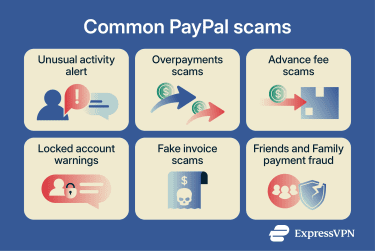
Friends and Family payment fraud
Friends and Family payments are designed for personal transfers, like splitting a bill. They’re not meant for commercial transactions and aren’t covered under Purchase Protection.
Scammers on marketplaces may ask buyers to send payment as Friends and Family to avoid fees. What they don’t say is that you lose protection. If the item doesn’t arrive, you have no claim.
Overpayment and advance fee scams
In overpayment scams, the buyer sends the seller a fraudulent payment for more than was agreed. Here’s how it works:
- The overpayment: The buyer sends a payment through PayPal for a significantly higher amount than required.
- The refund request: They claim it was a mistake or that the extra money was for shipping and ask you to return the extra funds immediately through a separate channel, often before the original payment has cleared.
- The reversal: The original payment is eventually flagged as fraudulent and reversed by PayPal.
- The loss: The money you returned separately isn’t part of the reversal. You end up losing both the original payment and the refunded amount.
No legitimate transaction requires you to return part of the payment through a separate channel. If you receive an overpayment, cancel the transaction entirely rather than sending money back through another route.
In advance fee scams, the target receives a message promising money or a reward and asks for a small upfront payment to release it. After you pay the fee, nothing arrives.
How to use PayPal safely
Most PayPal risks come from how you secure your account and payment choices.
- Use 2FA: Enable it in your PayPal account settings and use an authenticator app instead of SMS if possible, as it’s more resistant to SIM-swap attacks.
- Use a unique password: Reusing passwords across accounts means a breach on one site can expose your PayPal account. A password manager like ExpressKeys can help you store and generate unique passwords securely. ExpressKeys also supports passkeys and includes a 2FA generator.
- Set up account activity notifications: Turning alerts on for payments, logins, and account changes means you’ll notice unexpected activity when it happens rather than discovering it later.
- Control connected apps: Regularly review your connected third-party apps and remove anything you no longer use. Also limit permissions where possible.
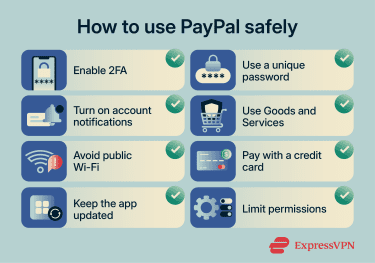
- Use the right payment type: Friends and Family payments have no purchase protection. Use Goods and Services for all commercial transactions. It’s the only payment type that makes you eligible for Purchase Protection if something goes wrong.
- Avoid public Wi-Fi: Try not to log in or send money on public, unsecured networks. If unavoidable, use a reputable virtual private network (VPN) to encrypt your connection and reduce interception risks.
- Keep the app updated: Updates patch known security vulnerabilities.
- Use a credit card where possible: Paying with a linked credit card gives you an additional dispute path outside PayPal. You may be able to raise a chargeback, which isn’t an option when paying from a bank account or PayPal balance.
What to do if something goes wrong
If you notice suspicious activity or an unauthorized payment, act quickly.
- Report unauthorized activity immediately: Go to PayPal’s Resolution Center and report the transaction as unauthorized. Change your password, check for connected devices or apps you don’t recognize, and revoke suspicious access.
- Open a dispute for transaction issues: If you paid for something that didn’t arrive or wasn’t as described, open a dispute through the Resolution Center and contact the seller through PayPal. Don’t try to resolve it outside the platform.
- Escalate unresolved cases to claims: If the seller doesn’t resolve the issue, escalate the dispute to a claim. PayPal reviews the evidence and makes a decision.
- Contact your card issuer if necessary: If you paid with a credit card and disagree with PayPal’s decision, contact your card issuer to request a chargeback. This is a separate process outside PayPal.
- Escalate to the Financial Ombudsman Service (FOS): If PayPal’s complaints process doesn’t resolve your issue and you’re in the U.K., you can escalate to the FOS. It’s a free, independent service that can review decisions made by FCA-regulated firms, including PayPal.
FAQ: Common questions about PayPal safety
Can someone access your bank account through PayPal?
Is PayPal safe for online shopping?
Is PayPal safer than entering my card details on websites?
Is it safe to link my bank account to PayPal?
Can PayPal refund scams?