VPN hardware vs. software: Fortify router or ExpressVPN apps?


ExpressVPN’s software includes applications you download, install, and use on compatible devices, such as computers, laptops, smartphones, tablets, and smart TVs. An ExpressVPN app secures the web traffic of the individual device it’s installed on.
On the hardware side, ExpressVPN has a custom interface built into GL.iNet’s Fortify GL-MT6000 router. The VPN runs at the router level, securing the web traffic of all devices connected to the router.
Both ExpressVPN software and hardware solutions encrypt internet traffic and mask IP addresses. Users typically choose VPN apps for ease of use, portability, and device-level security, while Fortify is suited to protecting all connected devices, including those that don’t support VPN software.
Fortify vs. ExpressVPN app: What's the difference?
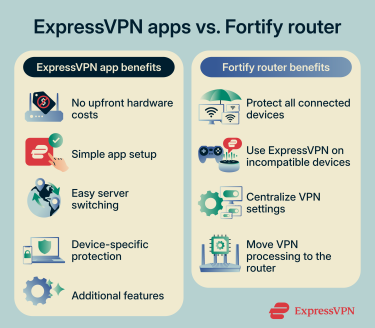
Here are the main differences between ExpressVPN’s apps and its Fortify integration:
| ExpressVPN app | Fortify router | |
| Where the VPN runs | On the device it’s installed on | On the Fortify router |
| Encrypts internet traffic | Yes, for the device it’s installed on | Yes, for all devices connected to the Fortify router |
| Masks IP addresses | Yes, for the device it’s installed on | Yes, for all devices connected to the Fortify router |
| Supported VPN protocols | Lightway, WireGuard, OpenVPN, IKEv2/IPsec, depending on platform | WireGuard |
| Setup | Requires downloading and installing a VPN app | Requires setting up the router and configuring VPN tunnels |
| Supported platforms and devices | Windows, macOS, Linux, iOS, Android, Chromebook, Android TV, Fire TV, Apple TV, browser extensions, Meta Quest, Amazon Fire | Any internet-capable device connected to the router |
| Simultaneous connections | Basic tier: 10
Advanced tier: 12 Express Pro tier: 14 |
Connect up to 86 devices to Fortify simultaneously; Fortify itself counts as just one device toward your ExpressVPN device limit |
| Server switching | Yes, available inside the VPN app | Configure multiple locations in one tunnel as a fallback sequence, or create separate tunnels to switch locations manually |
| Can be used away from home | Yes | Mainly intended for home network use |
| VPN processing uses device resources | Yes | Uses the router’s resources, not the individual connected device’s resources |
| Upfront hardware purchase | No | Yes |
| Best for | Individual devices, remote or mobile use | Whole-network protection, using ExpressVPN on devices not compatible with VPN apps |
Note that you can use ExpressVPN’s apps and the Fortify router together. You could set up Fortify at home to secure all connected devices and use the VPN apps when you take your devices elsewhere or disconnect them from your home network.
Using the ExpressVPN apps
When you use the ExpressVPN app on your device to connect to a VPN server, the software sets up an encrypted connection between your device and the server. Afterward, when you browse the web, all online data travels through the encrypted tunnel before it reaches the internet.
Using the ExpressVPN app means you use a dedicated application on your device to connect to VPN servers, change app or VPN settings, and use the available features.
Advantages of the ExpressVPN apps
Using ExpressVPN apps offers the following benefits:
- Convenient setup: Installing ExpressVPN’s apps is straightforward. You download the app, follow on-screen instructions to install it, then sign in and start using it. It’s also affordable, as you don’t need to buy additional hardware.
- Simple server switching: Changing VPN server locations on ExpressVPN’s apps is simple, as you don’t need to set up additional VPN tunnels. Instead, you just open the server list and select your desired location to connect.
- Device-specific protection: The VPN encryption only applies to the device it’s installed on. This is helpful if you don’t want the encryption to extend to other devices. That said, Fortify also supports per-device configuration, but you have to manage this centrally through the router.
- Extra features: ExpressVPN’s apps provide built-in access to additional features that can’t be accessed via Fortify, such as advanced protection (blocks ads, trackers, and malicious sites).

Note: Feature availability and functionality vary depending on which device you’re using and which tier you subscribe to.
Downsides of the ExpressVPN apps
ExpressVPN app protection is device-specific, meaning you have to separately install the VPN app on every device you want to secure. While installing the apps is simple, it may take some time if you need to protect a large number of devices.
Also, some devices don’t natively support VPN software, meaning you can’t install ExpressVPN’s apps on them. Examples include game consoles, smart speakers, security cameras, and smart TVs that use non-compatible operating systems.
Finally, the VPN processing needed to encrypt, decrypt, and route data happens on the device the VPN app is installed on. This may contribute to battery drain, which can be noticeable on mobile devices.
Using the Fortify router
With Fortify, the encrypted VPN connection runs on the router. Fortify establishes an encrypted tunnel to ExpressVPN’s servers and routes the traffic you configure through it. Devices connected to the router can then use this VPN connection without needing their own VPN apps.
Using Fortify means all VPN setups and tweaks happen on the router. You don’t connect to servers or change VPN-related settings on other devices.
Advantages of Fortify
If you set up Fortify, you can use ExpressVPN on all devices connected to your home network, including those that don’t natively support VPN apps. Fortify supports up to 86 concurrent devices.
Fortify also centralizes VPN management. You can configure which devices, connection types, and destinations use each VPN tunnel through the router’s ExpressVPN dashboard, without needing to change VPN settings on the individual devices.
Another advantage of using Fortify is that it moves the VPN processing from individual devices to the router. On some devices, especially smartphones, this may help optimize battery life.
Downsides of Fortify
Using Fortify requires you to purchase the router, which is an upfront cost you don’t have with ExpressVPN’s apps. You’ll also need to configure the router and its VPN connections yourself. Although you can add multiple server locations to a single tunnel, switching between locations manually may require setting up extra tunnels. Fortify’s built-in ExpressVPN interface is intuitive, but configuring multiple tunnels can still take time.
The Fortify router is also primarily designed to protect devices connected through your home network. When you take your devices elsewhere or connect them to another network, you'll need to use the ExpressVPN apps or another VPN connection to maintain VPN protection.
Another issue is that you don’t get access to some of the features available on the ExpressVPN apps. Fortify has a kill switch and lets you control which devices or websites use the VPN, but it’s missing advanced protection and doesn’t offer the Lightway protocol, for example.
How to set up the ExpressVPN app on your devices
After subscribing to ExpressVPN, follow these steps to set up the apps:
- Sign into your ExpressVPN+ dashboard and download the relevant app for your device.
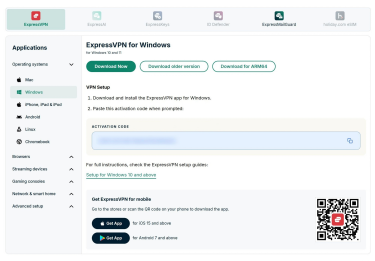
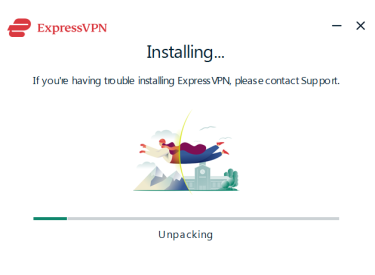
- Install the app and configure it by following any on-screen instructions.
- Open the app and sign into your ExpressVPN account.
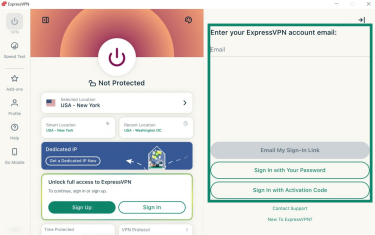
- You’re now logged into the ExpressVPN app. To connect, use the power button. By default, ExpressVPN selects the optimal server for your current location.
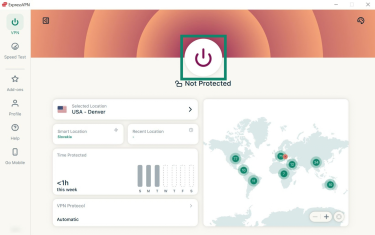
For more detailed instructions on how to install and use ExpressVPN apps on specific devices, please use the tutorials on our VPN setup page.
How to set up ExpressVPN on Fortify
Fortify includes 12 months of the ExpressVPN Advanced subscription tier for new and returning users who don’t have an active ExpressVPN subscription. Existing subscribers can use Fortify with their current subscription and redeem the included 12 months after their subscription expires, provided they claim the offer within two years of purchasing the router. We recommend reading the Fortify getting started guide to learn how to set up the router, redeem your subscription, and log into your account.
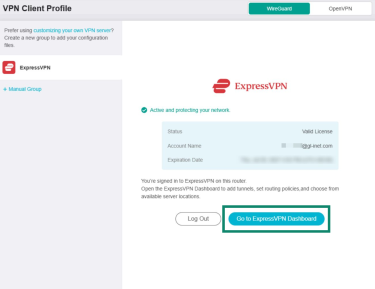
Once logged into your ExpressVPN account on Fortify, here’s how to set up a VPN connection:
- Click Go to ExpressVPN Dashboard to open the VPN dashboard.
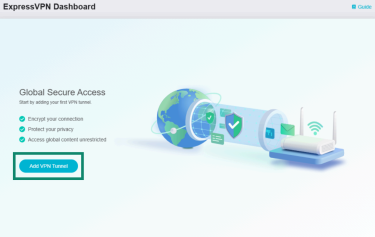
- Next, click Add VPN Tunnel.
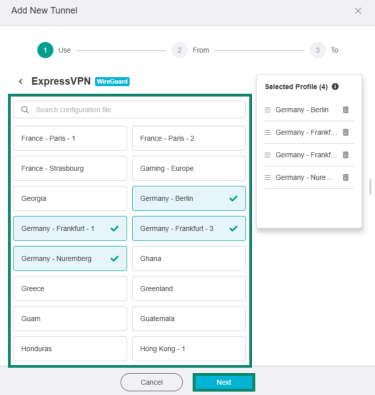
- Choose your desired VPN server locations and click Next.
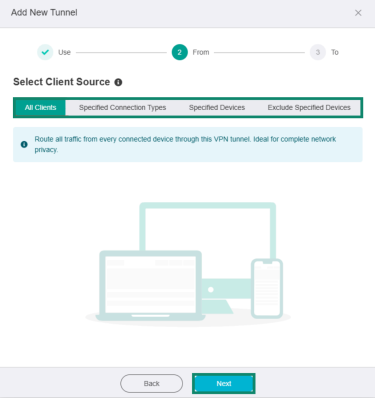
- Select which devices or types of connections on your router should use the VPN tunnel, then click Next.
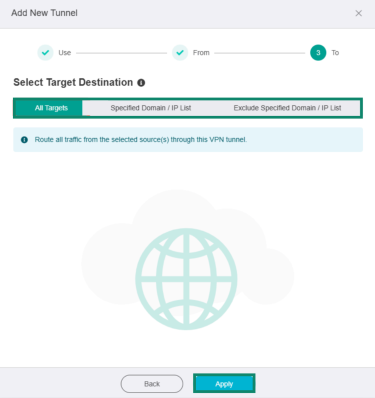
- Choose which online services use the VPN tunnel or your regular internet connection. When done, click Apply.
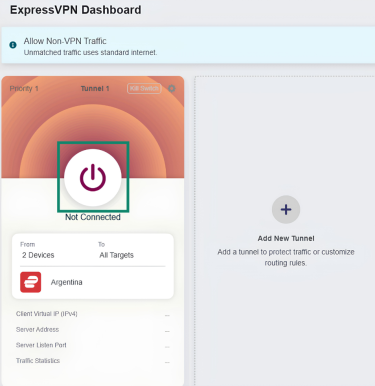
- The VPN tunnel will be added to the ExpressVPN Dashboard, which you’ll be redirected to. To activate the tunnel, click the power button.
For more detailed steps, refer to our Fortify VPN tunnel tutorial. We also recommend reading the Fortify kill switch guide to learn how to set up this security feature.
Which ExpressVPN setup is right for you?
Use the apps to protect your devices wherever you go, or choose Fortify to manage VPN connections across your home network, including devices that don't support VPN apps.
Protect your devices with ExpressVPN
Try ExpressVPN with a 30-day money-back guarantee for new users.
Get a router with ExpressVPN built in, plus 12 months of ExpressVPN Advanced for eligible customers.
FAQ
Does Fortify protect my traffic before it reaches the router?
Fortify encrypts your traffic at the router before sending it through the VPN tunnel to ExpressVPN’s servers. Traffic between your device and the router doesn’t pass through this VPN tunnel, so its protection depends on your local network connection and security settings.
Does Fortify protect every device connected to my network?
Fortify secures all devices connected to your network if configured to do so. When setting up VPN tunnels on Fortify, you can choose which devices use ExpressVPN. If you exclude a device from the VPN tunnel, it will use your regular internet connection and won’t be protected by VPN encryption.
Does Fortify use the same VPN protocol as the ExpressVPN app?
Fortify uses the WireGuard protocol, which is also available on most ExpressVPN apps. However, the apps typically use Lightway, ExpressVPN’s proprietary protocol, by default. Also, depending on the device, other protocol options may be available on apps, such as OpenVPN and IKEv2/IPsec.