
Expressvpn Glossary
Website architecture
What is website architecture?
Website architecture describes how a website’s content, data, and functionality are organized and interconnected. On the user-facing side, it serves as a structural blueprint covering hierarchy, primary and secondary navigation, URL structure, and internal linking.
On the backend, it can also describe how the website connects to content systems, data sources, and third-party services that support page delivery and site functionality. The architecture of a website, therefore, has important implications for usability, information flow, search engine optimization (SEO), performance, and business objectives.
How does website architecture work?
The fundamental building blocks of website architecture are individual web pages and the relationships between them. The architecture typically shows which pages are needed, how they are grouped, and how users and search engines can navigate them.
For a basic website, this includes core pages such as the homepage, about page, contact page, and blog. Larger, more complex websites may also include subdomains, dynamically generated pages, or localized versions for different languages or regions. Google recommends using distinct URLs for different language versions and supporting them with proper signals such as hreflang.
Navigation and internal links connect pages across the site. A typical structure might link from the homepage to category pages, from category pages to subcategory pages, and then to individual articles or product pages. Cross-links between related pages can also help users and search engines understand which pages are most important and how content is related.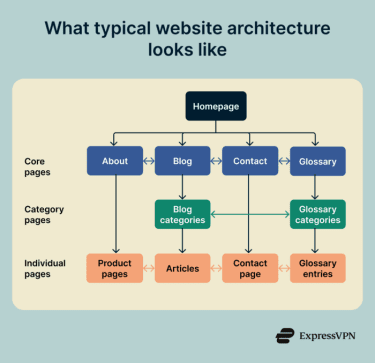
Types of website architecture
Website architecture can also refer to the underlying technical models used to build and deploy a website. Common types include:
- Static sites with content delivery network (CDN) hosting: Prebuilt HTML, CSS, JavaScript, and other assets are served as fixed files, often from object storage or a web server, and frequently distributed through a CDN. This is a common model for simple, content-focused websites.
- Three-tier: A common architecture for dynamic websites and web applications that consists of a presentation tier, an application or backend tier, and a data tier. The frontend handles presentation, the backend manages business logic, and the database stores information.
- Single-page apps (SPAs) with APIs: Web applications that load a single document and then update content dynamically in the browser. Frontends are often built with JavaScript frameworks such as React, Vue, or Angular, while backend functions are exposed through REST, GraphQL, or other APIs.
- Microservices behind an API gateway: A backend architecture often used for larger applications. Functionality is split across multiple services, each responsible for a specific task, with an API gateway commonly acting as the entry point for clients. This model can support SPAs, server-side rendering (SSR), and other application types.
- Serverless functions with managed databases: A cloud-based model in which application logic runs on demand in response to events or API requests, while data is stored in managed database services rather than on self-managed servers.
Why is website architecture important?
A well-planned website architecture helps teams to:
- Build clear navigational and content hierarchies that make information easier to find and support a better user experience.
- Support SEO by making pages easier for users and search engines to navigate and understand.
- Plan site structures that can scale more cleanly as content, features, or traffic grow.
- Make more efficient technical decisions around performance, reliability, and infrastructure.
From a technical perspective, choosing an appropriate architecture and documenting it clearly can help reduce technical debt. Changes made later at the system-architecture level are often more difficult, resource-intensive, and risky, so early planning helps reduce rework and supports long-term maintainability.
Risks and privacy concerns
A poorly designed or misconfigured website architecture can introduce several risks:
- Lateral movement: Weak segmentation or poor isolation between systems can enable attackers to move laterally after an initial breach.
- Data leaks: Insecure APIs can expose sensitive data due to weak authentication, broken authorization, excessive permissions, or improper validation.
- Regulatory violations: Excessive logging can capture personal data and security-sensitive information, such as IP addresses, cookie identifiers, or detailed user activity, which can create compliance risks under laws such as the General Data Protection Regulation (GDPR) if the data collection is unnecessary, excessive, or poorly governed.
- Unauthorized data sharing: External scripts can collect and share user data with analytics, advertisers, or third-party providers beyond the site’s core functionality, sometimes without sufficient transparency or valid consent.
- Improper caching of sensitive content: Misconfigured caches can expose private or personalized content by serving it to unintended users or storing it longer than intended.
Further reading
- What is a reverse proxy? Secure guide for VPN users
- What is a content delivery network?
- What is HTTP/2 and how does it work?
- Types of DNS servers: Everything you need to know
- DoS vs. DDoS attacks: Key differences and how to protect yourself