Expressvpn Glossary
Passwordless authentication
What is passwordless authentication?
Passwordless authentication is a way to verify a user’s identity without requiring them to enter a password.
Passwordless vs. traditional passwords
Unlike traditional password-based authentication, passwordless systems rely on alternative login factors and offer stronger protection against credential-based attacks while improving the overall login experience.
| Passwordless authentication | Traditional passwords | |
| Login method | Device-based approval, biometric verification, or one-time sign-in tokens | Username and password |
| Security | Can reduce exposure to password-related risks, like credential stuffing | Security depends heavily on password strength, reuse, and storage |
| Ease of use | Fewer credentials to remember | Familiar and widely supported, but it can require password creation, resets, and ongoing management |
How passwordless authentication works
Passwordless authentication can be implemented in different ways, but most flows follow the same pattern:
- A sign-in request is initiated, often with an identifier such as an email address or username.
- The system prompts for one or more passwordless factors to confirm the user’s identity. If multiple verification steps are required, the process is considered passwordless multi-factor authentication (MFA).
- The system verifies the result and grants or denies access.
Many modern passwordless systems use public-key cryptography. In these systems, the service stores a public key and the user’s device stores the matching private key. During sign-in, the device signs a verification request using the private key, and the service validates it using the public key. Other passwordless methods rely on temporary tokens, such as one-time links.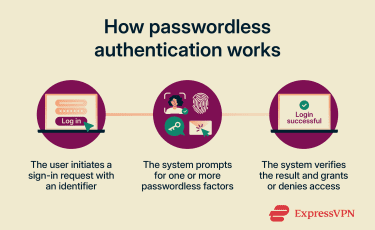
Common forms of passwordless login
Several passwordless authentication methods are available, with the most common listed below:
- Biometrics: Biometric authentication verifies a user’s identity using physical traits, such as fingerprints and facial features, as well as behavioral traits like voice and typing patterns.
- Passkeys: Passkeys are cryptographic credentials that allow users to sign into their accounts using the same authentication factors they use to unlock their devices. Common examples include biometrics, PIN codes, or patterns.
- Hardware keys: A security key is a physical device used to verify a user’s identity during the login process. It typically connects to a computer or smartphone and commonly takes the form of a USB stick or small fob.
- Magic links: Magic links work by having a user enter their email address during sign-in. The system then generates a unique code or token, stores it securely, and sends the user an email containing a URL with that code or token.
Benefits of going passwordless
Organizations often adopt passwordless authentication for the following reasons:
- Security: Reduces the risk of credential theft and account takeover by minimizing exposure to password-based attacks.
- User experience: Eliminates password fatigue, as users no longer need to create, remember, or manage multiple complex passwords.
- Compliance: Lowers the risk of password-related security incidents, helping organizations meet industry security standards more easily.
- Operations: Reduces the burden on IT and support teams by cutting down on password-related support requests and administrative overhead.
Challenges and limitations
The move to passwordless authentication isn’t possible for all companies due to the following reasons:
- Compatibility: Some organizations may use legacy systems that don’t natively support passwordless authentication methods.
- Cost: Switching to systems that support passwordless authentication or acquiring specific devices, like fingerprint readers and security keys, can be expensive.
- Training: Passwordless methods can be confusing for end users who are used to logging in with a username and password, so companies may need to account for employee training programs when making the switch.
Further reading
- What is phishing-resistant MFA, and why does it matter?
- How data breaches shaped the way we use passwords today
- What are passkeys?
- What is two-factor authentication (2FA), and how to set it up securely