Expressvpn Glossary
Network protocols

What are network protocols?
Network protocols are standardized sets of rules that define how devices communicate and exchange data over a network. They establish how data is formatted, transmitted, received, and processed, enabling different devices and systems to communicate reliably and consistently.
Network protocols function as a common language for computers, servers, routers, and other networked devices.
How do network protocols work?
Before data is transmitted over a network, it’s typically broken into smaller pieces called packets. These packets can be thought of as envelopes in a physical mail system: they contain both the “message” (the data) and instructions for delivery.
These instructions include addressing information for the sending and receiving devices. On a local network, devices use Media Access Control (MAC) addresses to identify one another. For communication across larger networks like the internet, Internet Protocol (IP) addresses tell the network where to route the packets.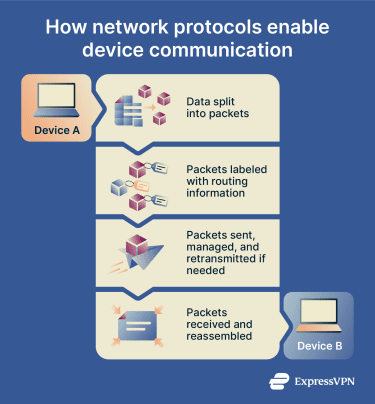 Transport protocols, such as the Transmission Control Protocol (TCP), help manage the delivery process. TCP can establish a connection between devices, ensure packets arrive correctly and in order, retransmit missing packets, and regulate data flow. Other transport protocols, such as the User Datagram Protocol (UDP), prioritize speed over reliability.
Finally, at the receiving device, the packets are reassembled in the proper sequence to reconstruct the original data.
Types of network protocols
There are many types of network protocols. Each one is designed to handle different information or services:
- Communication protocols: Define how data is sent and received over a network. Examples include TCP and UDP.
- Web protocols: Enable users to access and view websites. Hypertext Transfer Protocol (HTTP) and Hypertext Transfer Protocol Secure (HTTPS) are the most common.
- Email protocols: Support the sending and receiving of email. Examples include Simple Mail Transfer Protocol (SMTP), Internet Message Access Protocol (IMAP), and Post Office Protocol version 3 (POP3).
- File transfer protocols: Allow files to be moved between devices over a network. File Transfer Protocol (FTP) and Secure File Transfer Protocol (SFTP) are common examples.
- Security protocols: Protect data and connections on a network. Examples include Transport Layer Security (TLS) / Secure Sockets Layer (SSL) and Internet Protocol Security (IPsec).
Many network protocols operate automatically and are not directly visible to end users.
Why are network protocols important?
Network protocols are essential because they:
- Enable universal communication: Without network protocols, different devices and systems wouldn’t be able to exchange information.
- Enable reliable delivery: Communication protocols help prevent messages from being lost, corrupted, or delivered out of order.
- Support secure data exchange: Security protocols protect web browsing, email, and file transfers from interception or tampering.
Security and privacy considerations
Not all network protocols are secure. Some older protocols transmit data in plain text, which can expose sensitive information if intercepted.
Secure protocols use encryption to protect data as it travels across networks. Encryption “locks” the data, so even if someone intercepts it, they can’t read the information. Examples of secure network protocols include HTTPS for web browsing and SFTP for file transfers.
Insecure network protocols like Telnet and FTP send data in its original, human-readable form, which could expose sensitive information like usernames and passwords to cybercriminals.
Virtual private network (VPN) technologies rely on VPN protocols to create encrypted connections between a device and a VPN server. Examples include OpenVPN, WireGuard, and Lightway.
Keeping network devices and software updated helps ensure that known protocol vulnerabilities are patched and mitigated.
Further reading
- Network protocols? A detailed guide
- SSL vs. TLS: Key differences and why TLS is better
- HTTP vs. HTTPS: How to choose the secure option for your site