Expressvpn Glossary
Dynamic IP
What is a dynamic IP address?
A dynamic IP address is an Internet Protocol (IP) address that isn't permanently assigned and may change over time for a given connection or device. Dynamic addressing helps networks and providers automate IP assignment and, in many environments, reuse addresses from a pool as devices connect and disconnect
How a dynamic IP works
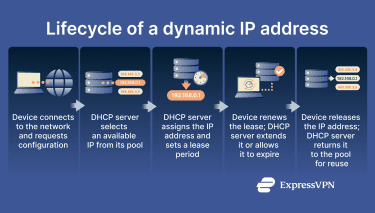
Dynamic IP assignment is usually handled automatically by the network. The steps below summarize what happens from the moment a device joins the network to how the address is maintained or changed over time.
- Assignment from a pool: An available IP address is selected from a managed pool rather than being reserved permanently.
- Dynamic Host Configuration Protocol (DHCP) allocation: DHCP coordinates the assignment and can also provide the required network settings, such as the default gateway and Domain Name System (DNS) servers.
- Lease-based use: In DHC, the address is issued with a time-limited lease that defines how long it remains valid.
- Renewal or replacement: Before the lease ends, a renewal request may extend the use of the same address; if renewal is not available, a different address may be assigned, and the old one returned to the pool.
- Changes after reconnects: After a restart, disconnect, or network change, the device may receive a different address if the previous one cannot be reused.
Benefits of dynamic IP addresses
Dynamic IP addresses can improve efficiency and operational simplicity.
- Efficient address use: Shared pools and reassignment can allow providers and networks to reuse IP addresses over time, reducing the number of addresses that must be reserved.
- Simpler administration: Automatic assignment and renewal reduce manual configuration and ongoing management effort at scale.
- Lower provisioning cost: Automatic allocation and reuse can be more cost-effective than dedicating a fixed address to every connection.
- Adequate for common internet activity: Routine uses such as web browsing, streaming, and email typically don't require a stable public IP address.
- Less reliable IP-only correlation: Periodic address changes make long-term tracking by IP alone less reliable, though other identifiers may still enable tracking, and IP addresses may still be linkable in some contexts.
Risks and limitations of dynamic IPs
Dynamic IP addresses can be limiting in situations that require a stable, predictable address.
- Unreliable for inbound hosting: Services that accept inbound connections (for example, self-hosted websites, APIs, or game servers) can become unreachable if the public IP address changes and clients rely on that IP.
- Remote access disruptions: Remote access setups that reference an IP address can stop working after reassignment.
- Poor fit for IP allowlisting: Access controls that depend on a fixed source IP generally require a stable public IP or a stable egress service.
- Fixed-address dependencies: Some enterprise systems and integrations require static IPs for consistent identification, allowlisting, or policy enforcement.
Dynamic vs. static IP
Dynamic and static IP addresses differ mainly by stability and how consistently they can be referenced.
| Dynamic IP | Static IP | |
| Stability | May change over time | Intended to remain the same |
| Assignment | Automatically assigned from a pool (commonly via DHCP) | Consistently assigned to the same customer/device (often via reservation or configured explicitly) |
| Tracking and reputation | Less consistent for IP-only long-term identification; may inherit prior address reputation | More consistent for IP-based identification; reputation is more consistently tied to the same address |
| Typical fit | General internet access and typical consumer connections | Hosting, remote access, and environments requiring IP allowlisting |
| Cost | Often included in standard service | Often offered as an add-on or higher-tier service |
Further reading
- Static IP vs. dynamic IP: Key differences
- Types of IP addresses explained: Complete guide
- How to set up a static IP address (step-by-step)
- What is a shared IP address? Understanding shared and dedicated IPs