Expressvpn Glossary
Data source
What is a data source?
A data source is the origin from which an application obtains data. It can be a file, a database managed by a database management system (DBMS), or a live data feed. The data source may reside locally or on a remote machine accessed over a network.
In many systems, the purpose of a data source is often to consolidate the technical details needed to access the data (such as drivers, network location, and authentication) into one place, abstracting these complexities from the application or user.
Types of data sources
Data can originate from various systems. Common types of data sources include:
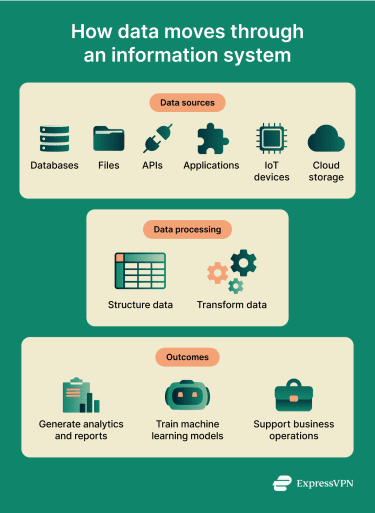
- Databases: Organized collections of data managed by DBMS software that supports electronic access and updates.
- Files: Data stored in formats like spreadsheets or plaintext, accessible by software reading the file contents.
- Applications: Software that provides data or functionality to other systems, acting as a data source.
- APIs and web services: Interfaces that enable data exchange between systems through machine-to-machine communication.
- Sensors and Internet of Things (IoT) devices: Devices that collect data from physical environments and transmit it to other systems.
- Cloud services: Cloud-hosted platforms and data stores that provide network access to data on demand (public, private, or hybrid, depending on deployment).
Structured vs. unstructured data sources
Structured data comes from sources where information is organized in predefined formats with fixed fields, such as rows and columns. This organization makes them easy to query and analyze using standard tools. Examples include relational databases and comma-separated values (CSV) files.
Unstructured data from a source lacks a standardized format or predefined data model. This makes it more difficult to process with conventional database systems. Examples include text documents, multimedia files, and social media content.
Why data sources matter
Data sources provide the raw information that organizations use to make decisions. The reliability of these decisions depends on the quality and accuracy of the data.
- Analytics and reporting: Supplying datasets used to analyze information, identify patterns, and generate reports.
- Machine learning (ML) and automation: Providing data to train ML models and support automated processes.
- Business operations: Storing and maintaining records that support routine organizational activities and information systems.
Security risks associated with data sources
Data sources often contain valuable information, making them common points of exposure and attack. Key risks include:
- Misconfigured databases: Inadequate network restrictions or missing authentication can allow unauthorized access.
- Unsecured cloud storage: Publicly accessible settings can expose data to unauthorized viewing or downloads.
- Outdated applications: Unpatched software may contain vulnerabilities that attackers exploit.
- Weak access controls: Excessive permissions increase the risk of account compromise or misuse.
- Unsecured data transfers: Data sent without protections such as Transport Layer Security (TLS) can be intercepted or altered in transit.
What are the best practices for securing data sources?
Securing data sources involves minimizing exposure and limiting the impact of security incidents. Encryption is used to protect data both when stored and during transmission across networks. Strong authentication methods verify identities before granting access, while role-based controls restrict access to authorized users only.
Regular monitoring and auditing of security events help detect and investigate incidents and support compliance. Timely application of updates and patches reduces vulnerabilities that attackers might exploit. Finally, restricting user privileges to the minimum necessary limits potential damage from compromised accounts.
Further reading
- How to deep search yourself and remove personal data from the web
- What are data brokers? A complete guide to your privacy and protection
- Data scraping: What it is and how it works
- Massive social media breaches are exposing your private life