Understanding the purpose of an SPI firewall in cybersecurity



Many home routers ship with a firewall setting called Stateful Packet Inspection (SPI). When connections drop, games lag, or apps misbehave, it’s often one of the first things people think about toggling off without knowing what it actually does. That guesswork can weaken security or, in some cases, mask the real problem instead of fixing it.
This guide explains what an SPI firewall is meant to do and how it differs from deeper inspection tools like deep packet inspection (DPI) and next-generation firewalls (NGFWs). You’ll also learn where it shows up in real gear and what “state” means when packets move across a network.
What is an SPI firewall?
An SPI firewall is a network firewall that tracks active connections and only allows traffic that belongs to an established session. The core purpose of SPI is to reduce exposure to unsolicited inbound traffic without forcing users to manage complex rules.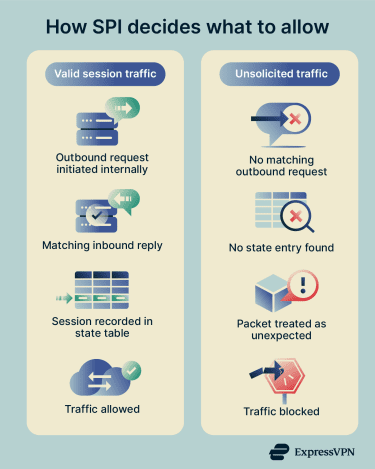
Instead of judging packets one by one, it understands whether incoming data is a valid reply or an unsolicited request. This approach fits well in everyday networks, where most traffic begins from inside the network and expects responses back.
Should SPI firewall be on or off?
In most cases, keeping SPI enabled is the safer default because it adds context to firewall decisions without much user effort. That said, SPI can interfere with certain applications or network setups.
Stateless vs. Stateful Packet Inspection firewall
A stateless firewall inspects each packet on its own, without any awareness of past or future packets. It makes decisions strictly by matching packet attributes such as source, destination, and port against a rule set. This model favors simplicity and speed but lacks context.
An SPI firewall adds that missing context by inspecting packets as part of an ongoing traffic flow. It tracks connections over their lifetime and evaluates packets based on whether they belong to an existing session. Because it groups packets for inspection, delivery may be delayed slightly compared to stateless filtering.
SPI firewall vs. DPI firewall
SPI focuses on connection state and packet metadata rather than what the packet contains. It looks at headers, flags, and session information to decide whether traffic should pass. This keeps inspection lightweight and avoids analyzing the contents of the data itself.
Deep packet inspection (DPI) goes further by examining the actual contents of packets beyond the headers. This deeper visibility allows identification of applications or behaviors, but operates at a different layer than SPI. Inspecting encrypted traffic often requires additional mechanisms, such as Transport Layer Security (TLS) decryption or Secure Sockets Layer (SSL) inspection, which are outside the scope of basic SPI behavior.
NGFW firewall vs. SPI firewall
An SPI firewall represents a narrower, foundational approach to traffic filtering based on session state. Its role is primarily to manage connection validity, while a next-generation firewall (NGFW) expands beyond this by identifying applications, users, and content. It often includes deeper inspection capabilities, and stateful inspection is one function among many, rather than the firewall’s main feature.
Where to find SPI firewalls
SPI firewalls aren’t limited to one type of product or network size. You’ll see them in consumer routers, business gateways, and cloud environments. Here are some common places where SPI shows up: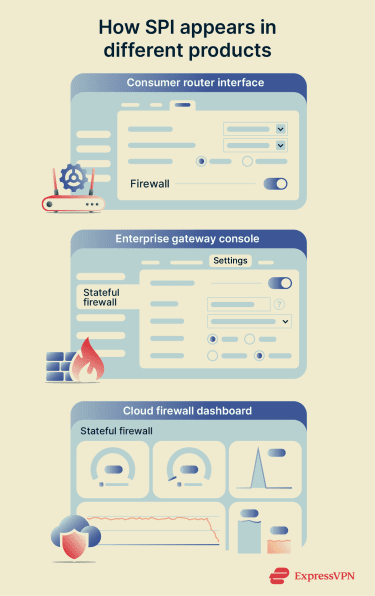
- Home routers: Many consumer routers include an SPI firewall as part of their built-in protection. It’s often enabled by default and may appear as a dedicated option or alongside Network Address Translation (NAT) related settings in the admin interface.
- Mesh Wi-Fi systems and router platforms: Mesh systems and router operating systems can also support SPI firewalls. In these setups, SPI typically runs as a built-in background security function rather than a prominent on-off toggle in the main interface.
- Business and enterprise gateways: In business-grade gateways, SPI usually appears under the broader term “stateful firewall.” Instead of a user-facing toggle, stateful inspection is listed as a core capability that tracks and filters active connections.
- Cloud network firewalls: Cloud providers offer managed, stateful network firewalls for virtual networks. These services apply the same session-based filtering principles as SPI firewalls, but deliver them at the cloud infrastructure level rather than on a physical device.
How does an SPI firewall work?
Monitoring the connection request
An SPI firewall begins by monitoring new connection attempts. At this stage, the firewall extracts Layer 3 and Layer 4 metadata, such as source and destination IP addresses, port numbers, protocol type, and Transmission Control Protocol (TCP) flags. In doing so, it evaluates whether the packet is attempting to initiate a new session or belongs to an existing one.
For TCP traffic, this typically means identifying a Synchronize (SYN) packet, which signals the start of a connection. The firewall understands the expected TCP handshake sequence and uses this knowledge to distinguish properly formed connection attempts from malformed or spoofed traffic. This ability to recognize valid protocol behavior is critical because attackers often send packets that mimic responses without ever completing a proper handshake.
At this stage, the firewall must also decide whether allocating resources for a new connection is justified. Excessive or suspicious connection attempts, such as large volumes of half-open TCP sessions, can be indicators of attacks like SYN floods, which specifically target the firewall’s connection-tracking mechanism.
Creating the state table
If the connection request passes policy checks and appears valid, the firewall creates a state table entry (not a new table). This entry is the firewall’s internal record of the connection and serves as its memory of the session. Each state entry is typically indexed using a 6-tuple key:
- Source IP address: The IP address of the system that initiated the connection, taken directly from the packet’s IP header.
- Destination IP address: The IP address of the intended receiver, used alongside the source address to uniquely identify the traffic flow.
- Source port: The Layer-4 port chosen by the sending host for Transmission Control Protocol (TCP) or User Datagram Protocol (UDP), or an equivalent identifier for other protocols such as Internet Control Message Protocol (ICMP).
- Destination port: The service or application port the traffic is trying to reach, or a protocol-specific substitute when TCP/UDP ports aren’t present.
- Protocol: The IP protocol number (e.g., TCP, UDP, ICMP), which tells the firewall how to interpret the packet and build the flow key.
- Security zone: The logical zone assigned based on the ingress interface where the packet enters the firewall, adding context about where the traffic is coming from.
Alongside this identifier, the firewall stores protocol-specific details, such as the current TCP state (e.g., handshake in progress or established), timestamps, idle timers, and in many implementations, NAT information. From this point forward, the firewall expects subsequent packets belonging to this session to match the parameters and progression defined by the state entry.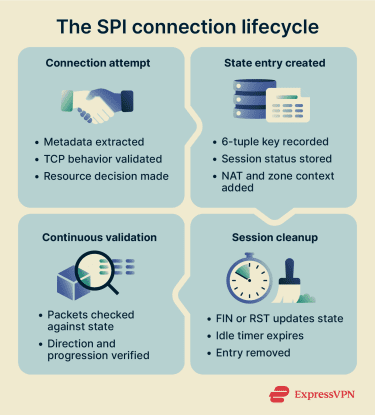
Filtering packets
Once a state entry exists, packet filtering becomes state-aware and continuous. Every packet passing through the firewall is checked against the state table to answer a single question: “Does this packet belong to a valid, correctly progressing session?”
If the packet matches an existing state entry and arrives in the expected direction with valid protocol behavior, it’s allowed, even if there’s no explicit rule permitting that specific inbound traffic. This is why stateful firewalls can allow return traffic for outbound connections without requiring mirrored inbound rules.
Packets that don’t match any existing state entry are treated as unsolicited. Inbound packets that claim to be responses but have no corresponding session record are dropped, which is how SPI firewalls block most unsolicited inbound attacks.
This behavior also explains why asymmetric routing can break connectivity when routing paths send return traffic through a different device than the one used to create the state entry. If return traffic bypasses the firewall that created the state entry, the firewall has no record of the session and discards the packets.
Updating connection status
An SPI firewall updates each state entry as traffic flows. For TCP connections, the firewall tracks progression through the handshake, data transfer, and shutdown phases. When it sees flags like Finish (FIN) or Reset (RST), which signal a connection termination or reset, it updates the entry accordingly.
The firewall also manages timeouts to keep the state table clean. If traffic stops for too long, especially for protocols like UDP that don’t formally close connections, the firewall removes the entry. Removing inactive entries prevents the table from filling with dead sessions and reduces the risk of stale sessions being reused.
Once the firewall deletes a state entry, it blocks any late packets that attempt to reuse the old connection parameters. This cleanup step ensures that only active, well-formed sessions remain valid and that every packet continues to pass strict state verification.
Features of an SPI firewall
SPI firewalls include features that support connection-aware filtering. These features define how the firewall manages sessions, validates traffic behavior, and controls state over time.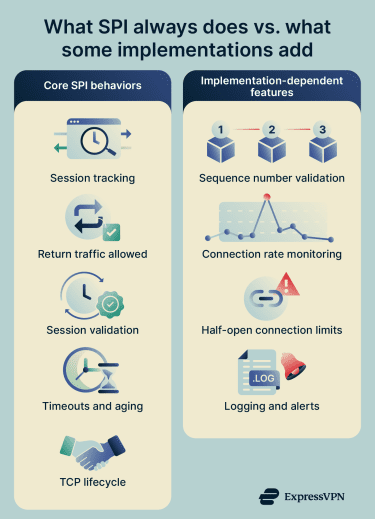
Core SPI behaviors
- Automatic return-path handling: An SPI firewall allows return traffic for established sessions without requiring separate inbound rules.
- Session-based traffic validation: The firewall allows return traffic only when it matches a valid, tracked session. It uses stored session state to distinguish valid responses from unsolicited inbound packets.
- Dynamic session state tracking: The firewall creates temporary, connection-specific state entries as sessions begin. It removes these entries when the session ends, preventing unused sessions from remaining active.
- Connection timeouts and aging: The firewall assigns timeout values to sessions based on protocol and service type. It ages out idle sessions and frees their resources when traffic stops.
- TCP teardown awareness: The firewall monitors TCP control flags such as FIN and RST. It updates or terminates session state immediately when endpoints close or reset a connection.
Implementation-dependent features
- TCP sequence number tracking: The firewall can track TCP sequence and acknowledgment numbers for active connections, and may drop packets whose sequence numbers fall outside the expected range for the session.
- Detection of abnormal connection rates: The firewall can detect unusually high rates of new connection attempts and may generate alerts when connection patterns exceed defined thresholds.
- Half-open connection limits: The firewall can limit the number of half-open (embryonic) TCP connections. This control helps reduce exposure to SYN flood conditions that can exhaust connection-tracking resources.
- State-aware logging and alerts: The firewall can log session lifecycle events, such as creation, denial, and closure. It can also record dropped packets along with the reason for the drop.
Benefits of an SPI firewall
An SPI firewall has practical advantages for day-to-day operations, particularly in maintaining stable and predictable traffic flows.
- Keeps existing connections stable during rule changes: SPI allows active connections to continue even when firewall rules change, helping prevent disruptions during routine network configuration updates. Rule updates apply only to new connections, so established sessions remain uninterrupted while policies evolve.
- Reduces the need for complex inbound rules: SPI allows response traffic automatically as long as the connection-tracking state remains active. This removes the need to create separate inbound rules for return traffic.
- Improves resource efficiency by clearing incomplete sessions: SPI identifies connections that fail to complete proper establishment and removes them. This prevents incomplete sessions from consuming resources unnecessarily.
- Helps preserve resources during high connection volumes: SPI releases session resources when connections drop or reset. This cleanup helps maintain capacity and can reduce the impact of excessive or stalled sessions.
Limitations of an SPI firewall
SPI firewalls inspect traffic at the network and transport layers, which limits how much they can understand about modern application behavior. Applications can run over non-standard ports as long as both ends agree on the protocol and port, which can reduce the effectiveness of port-based filtering in some scenarios.
Because SPI focuses on Layer 3 and Layer 4 attributes, it is not designed to detect evasive applications or traffic that appears valid at the session level but behaves differently at the application level.
This limitation also means SPI does not inspect for application-layer exploits. Evaluating traffic based only on IP addresses, ports, and protocols leaves room for activity that targets application logic rather than connection behavior.
For inbound web traffic, network firewalls alone are often not the recommended control. Web application firewalls monitor HTTP requests and responses and protect against common web exploits such as a Structured Query Language (SQL) injection and cross-site scripting (XSS). This highlights a clear boundary where SPI ends and application-layer protections begin.
How to check if the SPI firewall is enabled in your router
Here’s how to check if the SPI firewall is enabled in your router settings:
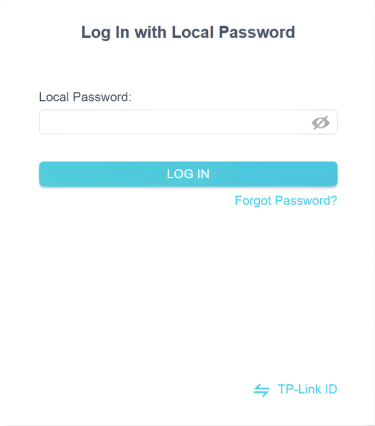
- Log in to your router’s admin interface: Connect to your router (Wi-Fi or Ethernet), open your browser, and go to your router’s gateway IP (often 192.168.1.1). Enter your admin username and password. If you’ve never changed them, check the sticker on the router or its manual.
- Find the firewall or security settings: Once logged in, look for sections labeled “Security,” “Firewall,” “Advanced Settings,” or “WAN/Internet Settings.” On a TP-Link router, navigate to Advanced > Security > Firewall & DoS Protection.
- Look for SPI firewall option: In the firewall settings, check for an option to enable SPI firewall. On some TP-Link routers, this option shows up as “IPv4 SPI Firewall’ and “IPv6 SPI Firewall.”
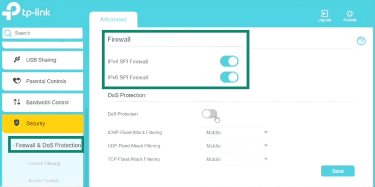
- Save and apply the setting: After you confirm or change SPI, click the interface’s Save or Apply button.
Many routers don’t mention SPI by name. If the firewall is enabled and the router blocks unsolicited inbound wide area network (WAN) traffic by default (e.g., requiring port forwarding for inbound connections), it’s performing stateful connection tracking, which serves the same purpose as an SPI firewall in consumer routers.
For additional confirmation, you can test your public IP address from outside your network using a port scan. If unused ports appear as closed or stealth, and unsolicited inbound traffic is dropped, your router is enforcing stateful filtering rules consistent with an SPI firewall.
When should you disable SPI firewall?
Disabling SPI changes how your router handles inbound traffic and connection control, so it shouldn’t be treated as a casual toggle.
- Troubleshooting issues: If a specific app, game, or service fails to connect, temporarily disabling SPI can help determine whether it’s interfering. If the issue resolves, this suggests SPI may be the reason. Re-enable SPI afterward and look for a targeted fix like port forwarding or protocol-specific settings.
- VPN-related issues: Some virtual private network (VPN) connections may fail when the router blocks or mishandles tunnel traffic. Enable VPN passthrough options, such as Internet Protocol Security (IPSec), before you disable SPI so the router allows those tunnels through the firewall. Only turn off SPI if passthrough and correct configuration don’t resolve the issue.
- Layered or dual-router setups: When you connect two routers in series, double NAT can create routing or connectivity problems. Configure the upstream device in bridge mode, so only one device performs the firewall’s function. In structured networks that use a dedicated firewall as the edge device, adjust or disable SPI on the secondary router only if another firewall actively protects the network.
- Performance testing: SPI inspection adds packet validation checks, which can affect throughput depending on the router’s implementation. If you run controlled performance tests, temporarily disabling SPI may change measured speeds. Re-enable it after testing to restore normal traffic validation.
SPI is enabled by default on most consumer routers for good reason. Unless you have a specific technical need and understand the implications, keeping it enabled provides validation against malformed or suspicious traffic without affecting most normal internet use.
Best practices in using SPI firewall
SPI strengthens connection control at the router level, but it works best when paired with basic network hygiene.
- Keep router firmware updated: Outdated firmware can expose your router to known vulnerabilities. Enable automatic firmware updates when available, or perform regular patching to secure your Wi-Fi network.
- Replace unsupported hardware: Devices that no longer receive security updates remain exposed to known weaknesses. Moving away from end-of-life equipment reduces long-term risk from unpatched flaws.
- Use strong admin credentials: Default usernames and passwords are easy targets. Use a complex, unique password that combines upper- and lowercase letters, numbers, and special characters to prevent unauthorized access to the router interface.
- Limit remote management: Remote access increases exposure to the public internet. If remote control is necessary, restrict it to specific IP addresses and use secure remote access technologies, rather than leaving the interface broadly accessible.
- Network segmentation: Separate guest devices from your primary network, which helps secure smart homes. Where supported, place devices into different virtual local area networks (VLANs). This limits lateral movement between device groups.
FAQ: Common questions about SPI firewalls
What is a Stateful Packet Inspection (SPI) firewall used for?
Should I enable Stateful Packet Inspection (SPI) firewall?
Should I turn the SPI firewall on or off for gaming?
Does the SPI firewall slow down the internet?
What is a disadvantage of using a stateful inspection firewall?
Take the first step to protect yourself online. Try ExpressVPN risk-free.
Get ExpressVPN