Gemini vs. ChatGPT: Which AI tool should you use in 2026


Gemini and ChatGPT are among the two best-known generative AI tools for writing, research, coding, file analysis, image generation, and everyday productivity. For most users, the better choice will depend on the task, existing subscriptions, and the level of control needed.
What is Google Gemini?
Gemini is Google's AI assistant, available as a standalone app or embedded directly inside Gmail, Docs, Drive, and other Google Workspace tools. It runs on Google’s proprietary Gemini models, with some paid plans offering large context windows for long documents and codebases. It can also connect to Google apps and use information from services such as Gmail, Drive, Calendar, Maps, YouTube, and Photos when enabled, though data handling varies by account type, settings, and Workspace license.
What is ChatGPT?
ChatGPT is a conversational AI assistant available on the web and on mobile devices. It runs on OpenAI's GPT models and serves as a dedicated workspace with tools such as web search, deep research, image generation, custom GPTs, and code execution. ChatGPT can connect to external apps via integrations, but it is less natively integrated with productivity suites than Gemini is in Google Workspace.
Also read: ChatGPT alternatives to consider for writing, coding, research, and images.
Gemini vs. ChatGPT: Key differences
| Gemini | ChatGPT | |
| Best fit | Users working primarily in Google apps or those who want Google’s built-in image and video tools | Users who need project workspaces, custom assistants, or workflows across multiple non-Google tools |
| Research capabilities | Stronger with Google Search and Google-connected context, especially Gmail, Drive, Photos, YouTube, and related Google AI tools | Stronger with web research, uploaded files, and connected third-party apps such as Google Drive, Slack, SharePoint, GitHub, and more |
| Customization | Gems, Personal Intelligence, and Google-connected context | Custom GPTs, Projects, memory controls, and app-based workflows |
| Ecosystem | Deep Google Workspace integration (Gmail, Docs, Drive, Sheets, Meet, Calendar) | Broader third-party app integration |
| Context window | Up to 1M tokens with Gamini in Pro/paid long-context features | Varies by model and plan; up to 400K tokens in ChatGPT Pro with Thinking selected. |
| Coding performance | Strong for long-context code review and Google’s developer ecosystem | Strong for coding, debugging, pull request review, and agentic workflows; |
| Image and video generation | Image generation and Google video tools | Image generation. Note that OpenAI video tools have changed, with Sora web/app discontinued in April 2026 |
| Accuracy verification | Double Check uses Google Search to help compare Gemini’s claims against related web content | Deep Research cites sources, but manual verification is still required |
| Privacy (personal accounts) | Human reviewers may review some activity; with Keep Activity off, future chats are still saved for up to 72 hours | Personal content may be used for model training unless you opt out; some content may be reviewed by humans for safety, abuse, support, or legal reasons. |
Models
Google Gemini offers Fast (quick responses), Thinking (reasoning-focused tasks), and Pro (best suited for complex tasks like math and coding) modes. Fast is the default option, while Thinking and Pro may be available with usage limits that increase with paid Google AI subscriptions.
Ultra subscribers also get access to Gemini 3 Deep, an enhanced reasoning mode for complex math, science, and logic problems.
ChatGPT free users get GPT-5.5 Instant with a cap of 10 messages every 5 hours, which handles daily tasks like brainstorming and answering simple queries. Paid plans unlock GPT-5.5 Thinking, with usage limits that vary by plan. GPT-5.5 Thinking is designed for more complex reasoning tasks and may provide a visible plan or summary before answering. Pro, Business, Enterprise, and Edu users also get access to GPT-5.5 Pro, which is designed for high-stakes, complex work and advanced tasks that require deeper reasoning.
Core capabilities
Both tools handle standard AI tasks such as writing, coding, research, and data analysis, but differ in their specialized features.
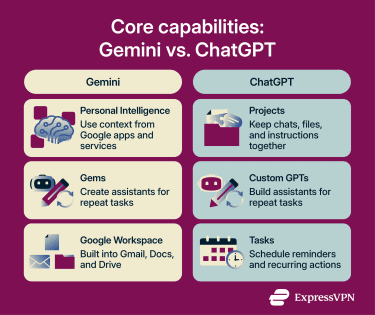
Gemini is noteworthy for:
- Personal Intelligence: Uses context from connected Google apps and services, such as Gmail, Photos, YouTube, Search, and Chrome, when enabled and available.
- Auto Browse: Automates multi-step web tasks in Chrome, such as managing reservations, booking travel, or shopping, with availability limited by plan, region, and rollout.
- Gems: Custom AI assistants that follow your instructions for repeated tasks, similar to Custom GPTs.
ChatGPT’s standout features include:
- Projects: Workspaces that keep chats, files, and custom instructions together for long-running tasks.
- Tasks and agentic workflows: ChatGPT can run scheduled tasks, and business users can connect ChatGPT to supported apps and workflows.
- Custom GPTs: AI assistants with specific instructions for repeated tasks.
- Pulse: Does once-daily asynchronous research for Pro users and delivers briefings based on past chats, memory, and feedback.
Context window and memory
ChatGPT context limits depend on the plan, workspace, and model. For example, some OpenAI business and enterprise documentation lists Instant at 32K or 128K, while Thinking and Pro can support up to 196K tokens.
Google AI Plus offers a 128K expanded context window, while Google AI Pro and Ultra increase that to one million tokens. This allows Gemini to handle much larger files or entire codebases in a single prompt.
Memory refers to stored or referenced context from past interactions, such as saved preferences, goals, writing style, or project details. ChatGPT’s Memory can save useful details and reference past chats to personalize future responses. You can manage saved memories and chat-history references through personalization settings.
Gemini’s Personal Intelligence can use context from connected Google apps and services, and Gemini can also use the memory of past chats when that feature is enabled.
Web search and deep research
Both tools can search the web for current information, but they draw on different search and source ecosystems. Gemini is closely tied to Google Search and Google apps, while ChatGPT can search the public web, specific sites, uploaded files, and enabled apps. This means sources and perspectives may vary depending on the tool and settings.
ChatGPT Deep Research can conduct multi-step research and produce cited reports that may take up to 30 minutes for more complex requests. It creates a research plan, searches and synthesizes many sources, and delivers a comprehensive cited report. You can attach files for added context, search the public web, restrict research to specific websites, or use enabled ChatGPT apps.
In both ChatGPT and Gemini, Deep research can be started from the Tools menu in the prompt box.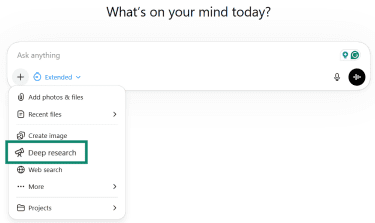
Gemini Deep Research can draw on Gmail, Docs, Drive, and Chat when connected and permissions are granted. For developers, the Gemini Deep Research Agent can also connect to external tools through Model Context Protocol (MCP) servers. It generates cited reports and can turn research into interactive Canvas content, with visualizations such as charts and graphs in supported workflows.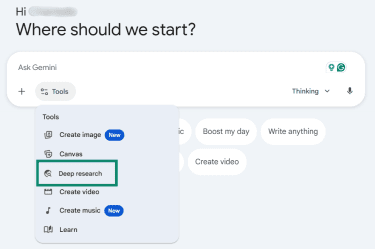
Integrations
Gemini’s biggest strength is its native integration with Google Workspace, which can speed up setup for Google-first teams. Workspace Intelligence helps Gemini use context from Workspace content such as emails, documents, calendar events, meeting notes, and chats. Gemini is also available in supported Workspace apps, including Gmail, Docs, Sheets, Slides, Drive, Chat, and Meet, reducing the need to switch between tools.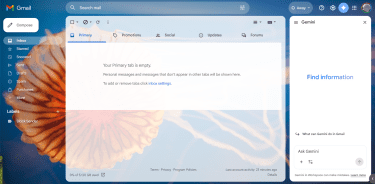
ChatGPT isn't tied to a single suite. The ChatGPT App Directory and app integrations connect to external services such as Adobe Photoshop, Google Drive, SharePoint, GitHub, HubSpot, and other supported apps. This makes it flexible for teams using multiple software providers.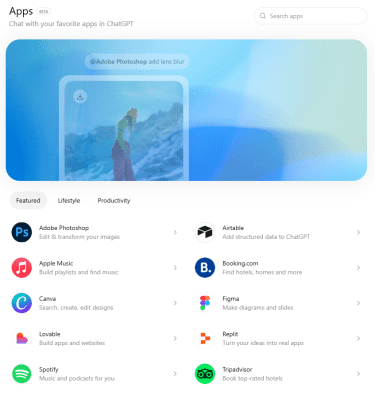
Gemini vs. ChatGPT: Pricing and value
Both companies offer multiple pricing plans. Google’s paid AI lineup includes Google AI Plus, Google AI Pro, and Google AI Ultra. ChatGPT offers Free, Go, Plus, Pro, Business, Enterprise, and Edu plans.
For individual users, Google AI Pro vs. ChatGPT Plus is the closest comparison at around $20/month.
Free plan comparison
| Area | Gemini free plan | ChatGPT free plan |
| Default model | Fast mode, powered by the Gemini 3 family | GPT-5.5 Instant |
| Higher-end model access | Limited access to Thinking and Pro modes, with limits that vary by usage and plan | Limited GPT-5.5 access; paid plans add manual model selection and higher limits |
| Message limits | Dynamic limits based on usage, prompt complexity, file uploads, and conversation length | 10 GPT-5.5 messages every five hours before switching to the mini version |
| Context window | 32K tokens | 16K tokens for GPT-5.5 Instant |
| Research access | Limited | Limited |
| File and image tools | Access to selected Gemini tools, with dynamic limits | Limited uploads and slower image generation |
| Best for | Users who want to try Google’s AI features across search, research, and productivity | Users who want basic access to ChatGPT for everyday writing, files, images, and search |
Paid plan comparison
| Area | Google AI Pro | ChatGPT Plus |
| Price | $19.99/month | $20/month |
| Best for | Users who want Gemini across Google apps, plus NotebookLM and Google storage | Users who want a standalone AI workspace for writing, research, coding, files, and custom assistants |
| Main model access | Access to Gemini 3.1 Pro and higher Gemini app limits | GPT-5.5 Thinking |
| Research tools | Higher Deep Research limits in Gemini; expanded NotebookLM features | Expanded Deep Research and agent mode |
| Creative tools | Image and video generation; some creative tools vary by region and plan | Image generation |
| Coding tools | Higher limits in Gemini CLI, Code Assist, and Google Antigravity | Expanded Codex usage for coding tasks |
| Storage | 5TB across Google Photos, Drive, and Gmail | No bundled storage |
| Best value if | You already pay for Google storage, or you work mostly in Google apps | You want a flexible AI workspace not tied to one productivity suite |
A few other paid plans exist on each side, but they serve different users. Google AI Plus is a lower-cost step up from the free plan, with 200GB of storage and expanded access to Google AI features. Google AI Ultra targets high-volume users who need the highest limits: 30 TB of storage and full access to Google’s advanced AI tools.
ChatGPT Pro is the power-user tier above Plus, with higher usage limits, GPT-5.5 Pro, maximum memory and context, and maximum access to Deep Research and agent mode. ChatGPT Business, Enterprise, and Edu are designed for teams, companies, and schools that need shared workspaces, admin controls, centralized billing, and stronger privacy and security protections.
Gemini vs. ChatGPT: Performance by task
The differences become more apparent in specialized tasks like coding, research, or data analysis.
Writing and content creation
Both tools handle drafts and rewrites well, but they fit different workflows. Gemini edits documents and emails directly in Google Docs and Gmail, making it better suited for users who work primarily in Google Workspace.
ChatGPT organizes longer writing projects across multiple sessions and retains style preferences through its memory features, which helps maintain consistency in ongoing work.
Research and analysis
Gemini can draw from Google sources such as Gmail, Drive, and Chat when connected. NotebookLM offers a separate Google research workspace for analyzing selected sources from the web, Google Drive, or uploaded materials. ChatGPT can work with uploaded files, web sources, and connected apps, making it flexible for users who need to combine information from multiple platforms.
Both create charts and tables from data, but their workflows differ. Gemini generates charts in Google Sheets and can also analyze large files, though Sheets is the most direct workflow for spreadsheet-based visualizations. ChatGPT creates charts from uploaded files in the chat interface and lets you refine them through follow-up questions.
Coding and debugging
ChatGPT's paid tiers offer Codex/GitHub integration for pull request review and support iterative debugging through follow-up questions, code edits, and explanations.
Gemini's large context window can analyze sizable repositories or up to 30K lines of code at once, which is useful for understanding large projects.
Published coding benchmarks vary by model version, tool setup, and evaluation method, so they should be treated as directional rather than definitive. In practice, ChatGPT is strong for agentic coding workflows and pull request reviews, while Gemini’s advantage lies in long-context code analysis.
Image understanding and multimodal tasks
Both models process and describe images, but Gemini offers a broader creative ecosystem. It includes image generation and video tools powered by Veo 3.1 on paid plans. Google Vids also includes custom music generation powered by Lyria 3 and Lyria 3 Pro, though availability depends on the product, plan, and rollout.
ChatGPT focuses on text, coding, data analysis, and image generation using OpenAI’s current GPT Image models. Video generation via Sora was discontinued for web and app users in April 2026, and the API is scheduled to be discontinued on September 24, 2026.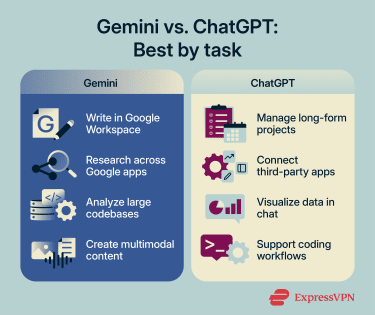
Gemini vs. ChatGPT: Accuracy and privacy
This part of the comparison comes down to trust. We examine how each tool verifies information and protects user privacy.
Accuracy and fact-checking
Neither tool qualifies as a final source of truth. Both OpenAI and Google continue to advise users to verify important outputs, even as newer models improve accuracy.
OpenAI reports that newer GPT-5 models have improved factuality compared with earlier models, but hallucinations have not been eliminated. ChatGPT can still produce incorrect information, so important claims should be independently verified.
Deep Research produces citation-backed reports with source links, allowing users to trace claims back to supporting material. However, the sources still need to be reviewed manually.
Likewise, Gemini's documentation advises users to supervise outputs and verify results. The Double Check feature uses Google Search to help compare Gemini’s statements with related web content, highlighting claims that appear corroborated or contradicted.
Gemini's newer Deep Research Max adds collaborative planning, letting users review and refine the research strategy before it begins, though availability depends on plan and rollout.
Privacy and data handling
For personal Gemini accounts, Google may use Gemini Apps activity to improve its products, services, and machine-learning technologies. Human reviewers may read, annotate, and process some conversations to improve Google services, and Google may retain some data for legal or regulatory reasons.
Even if Gemini Apps Activity is off, Google saves future chats for up to 72 hours to provide the service, process feedback, and maintain safety and security. For Gemini in Google Workspace business and education accounts, customer content is not reviewed by humans or used to train generative AI models outside the domain without permission.
For personal ChatGPT Free, Plus, and Pro accounts, OpenAI may use your content to improve its models by default, unless you opt out through Data Controls or the privacy portal. ChatGPT Business, Enterprise, Edu, and API content is not used to train OpenAI models by default, unless the organization opts in.
This means your account type and settings directly affect your privacy. For sensitive work, use an approved business or educational account with appropriate privacy settings and follow your organization’s data-handling policies. Avoid entering confidential, regulated, or personal data into consumer AI accounts.
For a more privacy-focused AI option, read more about ExpressAI, which uses secure enclaves and zero-access encryption, so that prompts, outputs, and files are readable only within the secure enclave and aren't used to train models. ExpressAI also offers access to Gemma 4 31B, a multimodal model from the same family as Gemini that can understand text, images, and video while maintaining the platform’s privacy-focused approach.
Reliability and operational limits
Both systems generate outputs by identifying patterns in data rather than independently verifying facts or applying professional judgment. This can cause several problems:
- Hallucinations: Facts, statistics, citations, or quotes can be invented and presented with confidence.
- Instruction drift: Long or complex prompts can cause instructions to be missed or deprioritized.
- Nuance flattening: Subtle cultural context, industry jargon, or creative tone can be lost.
- Overly cautious tone: Feedback can become too softened when direct criticism is needed.
- Context gaps: Details buried in long prompts, files, or conversations can be missed, even with large context windows.
- File misreading: Rows, exact values, or labels can be missed in scanned files, image-based tables, or complex layouts.
- Intent gaps: A technically correct answer can still miss the real-world goal.
For these reasons, AI tools aren't a substitute for source checks or professional judgment.
FAQ
Is Gemini better than ChatGPT?
Which AI is easier for beginners?
Which AI works better for multilingual tasks?
Can Gemini and ChatGPT work together in one workflow?
Which AI is more reliable for everyday office tasks?
Which AI is the better long-term choice for most users?